Pages

Subscribe:

Ads 468x60px

Labels

Showing posts with label applications. Show all posts

Friday, December 7, 2012

iQuran (القرآن الكريم)

Read the Holy Quran in Arabic alongside its Translation. Provides verse by verse audio playback, repeat functions, unlimited bookmarks, search, excellent navigational controls, several translations and reciters and much more.
Apart from offering an immersed user experience, the free version of iQuran includes the following limitations only:
* Full Landscape supported only for the first 5 chapters
* A maximum of 5 bookmarks
* One english translation: Shakir
* Search results limited to 20 per search
* One recitation: Sheikh Husary
iQuran has been designed to work on all Android devices.
القرآن الكريم
بسم الله الرحمن الرحيم
والصلاة والسلام على معلم البشرية سيدنا ونبينا
محمد وعلى آله وصحبه وسلم.
تم بحمد الله تعالى إعداد برنامج القرآن الكريم .
أسأل الله العظيم أن يكتب أجر هذا البرنامج
لكل من ساهم في نشره. وأسأل الله أن ينفع به الأمة.
كماأهدي هذا البرنامج لجميع المسلمين

Download

Islamic Prayer Time and Qiblah

prayer time for Muslim community
Free prayer time for every Muslim in the world. these time follow your network or gps.
Also Azan alarm for reminder you pray everyday.

Monday, December 3, 2012

Android App Manager

Best App Manager
Android App Manager is the overall system application.
Applications, Sd card, Device, system information can be managed in a single shot.
Android 2.2 or later installed apps on the platform, the SD Card will support.
Move this app(AAM) to the SD Card, but widgets are not working.

Saturday, December 1, 2012

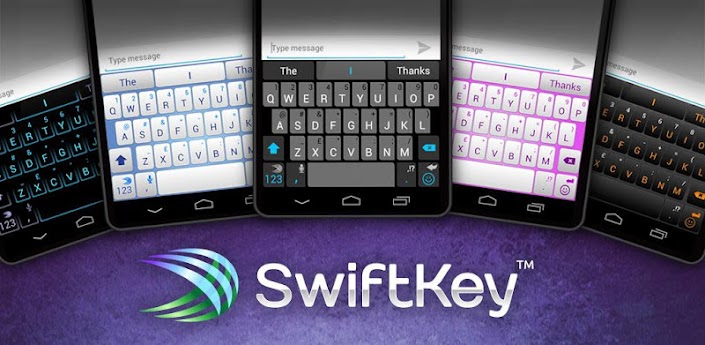
SwiftKey 3 Keyboard (paid version)


SwiftKey 3 Keyboard
Unlock your typing potential.
Get SwiftKey 3 – the best keyboard on Android!
#1 selling app in 30 countries - over 1 ½ million sold
60,000 5✮ reviews
Multiple award-winner, including “Most Innovative Mobile App”
Don’t miss out – get SwiftKey today

AlAsmaa – 99

The 99 names of Allah. (Al Asma ul Husna)
“Grid” view shows all the names in one screen making it easy to find names quickly and to memorize them.
“Gallery” view features:

Friday, November 30, 2012

Sygic GPS Navigation

Premium turn-by-turn GPS navigation app.
Sygic is a voice guided GPS navigation app. It’s packed with TomTom maps and a robust set of navigation features. Both app and maps are updated for free. Maps are stored on the phone for offline use.
Sygic is trusted by millions of customers around the globe.
7 DAYS TRIAL
AVAILABLE MAPS:
Algeria, Andorra, Angola, Argentina, Australia, Austria, Azerbaijan, Bahrain, Belgium, Benin, Botswana, Brazil, Brunei, Bulgaria, Burkina Faso, Cameroon, Canada, Canary Islands, Colombia, Croatia, Czech Republic, Democratic Republic of Congo, Denmark, Egypt, Estonia, Finland, France, Gabon, Germany, Ghana, Gibraltar, Greece, Hong Kong, Hungary, Chile, India, Indonesia, Iran, Iraq, Ireland, Israel, Italy, Kazakhstan, Kenya, Kuwait, Latvia, Lesotho, Liechtenstein, Lithuania, Luxembourg, Macau, Malawi, Malaysia, Mali, Malta, Mauritania, Mauritius, Mayotte, Mexico, Monaco, Morocco, Mozambique, Namibia, Netherlands, New Zealand, Niger, Nigeria, Norway, Oman, Pakistan, Philippines, Poland, Portugal, Qatar, Republic of Congo, Reunion, Romania, Russia, San Marino, Saudi Arabia, Senegal, Serbia, Singapore, Slovakia, Slovenia, South Africa, Spain, Swaziland, Sweden, Switzerland, Taiwan, Tanzania, Thailand, Togo, Tunisia, Turkey, Uganda, Ukraine, United Arab Emirates, United Kingdom, Uruguay, USA, Vatican, Venezuela, Vietnam, Zambia, Zimbabwe

Ultra Voice Changer

Discover your Robot,Alien,Chipmunk,Helium voices !
Free technical support is available, for this app, if you email me.
If you get abnormal playback results, even with the Normal voice effect, your
device may not be able to record properly in stereo mode. To rule this out, within the app, try selecting the 44100 mono (or 22050 mono) recording mode, via Menu->Prefs.
NOTE: When recording, try using different recording volume levels (look for the recording volume control within the app) in order to find the levels that work best for your device. The default recording level of 1 may not be optimal for your device, so you may need to play around with that setting to get good recordings..
If you hear excessive static during playback, try lowering your recording volume and make a new recording using this lower recording volume setting.
TROUBLESHOOTING CHECKLIST:
If you are unable to record audio using this app, try the following:
CHECK 1: Speak closely into the microphone.
CHECK 2: Raise the speaker volume on your phone/device.
CHECK 3: Raise the recording volume from within the app.
CHECK 4: Also, if you have a bluetooth headset and you are not able to record audio or just get static, try turning your bluetooth headset off and see if that resolves the issue.
CHECK 5: From within the app, try selecting a different audio recording rate, via Menu->Prefs. Supported audio recording rates include: 44100 stereo, 22050 stereo, 11025 stereo, 44100 mono, 22050 mono, 11025 mono, 48000 stereo, 48000 mono, 8000 mono. Depending on your device, only a subset of these recording rates may be available to you.